
Download Track My Golf – Free Golf Tracker for macOS
Overview
Track My Golf is a free, lightweight program designed specifically for Mac users who want to keep a detailed record of every round they play. Developed by APG Solutions, LLC, this sports‑focused application blends a clean macOS‑native interface with powerful analytics, making it a perfect companion for both casual weekend golfers and serious tournament players. The software is built in English and follows Apple’s Human Interface Guidelines, which means you’ll enjoy smooth navigation, native gestures, and a look that feels right at home on your MacBook, iMac, or Mac mini.
While the core app is free, it also supports optional in‑app purchases for advanced statistical modules, but the free version already offers a comprehensive set of tools for tracking scores, analyzing performance trends, and even sharing results with friends via email or social media. Its primary goal is to simplify the process of logging each shot, hole, and round, while providing insights that help you lower your handicap over time. Whether you’re playing a quick nine‑hole round or a full 18‑hole tournament, Track My Golf records every detail—stroke count, club selection, distance, and even weather conditions—so you can review your game later and make data‑driven improvements.
The app also integrates with Apple’s HealthKit, allowing you to see how your physical activity during a round contributes to your overall fitness goals. In short, Track My Golf offers a secure, free, and easy‑to‑use solution for macOS golfers who want to transform raw scores into actionable performance data.
Key Features
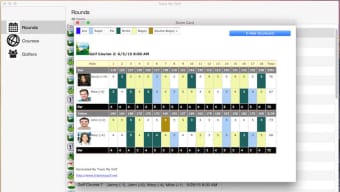
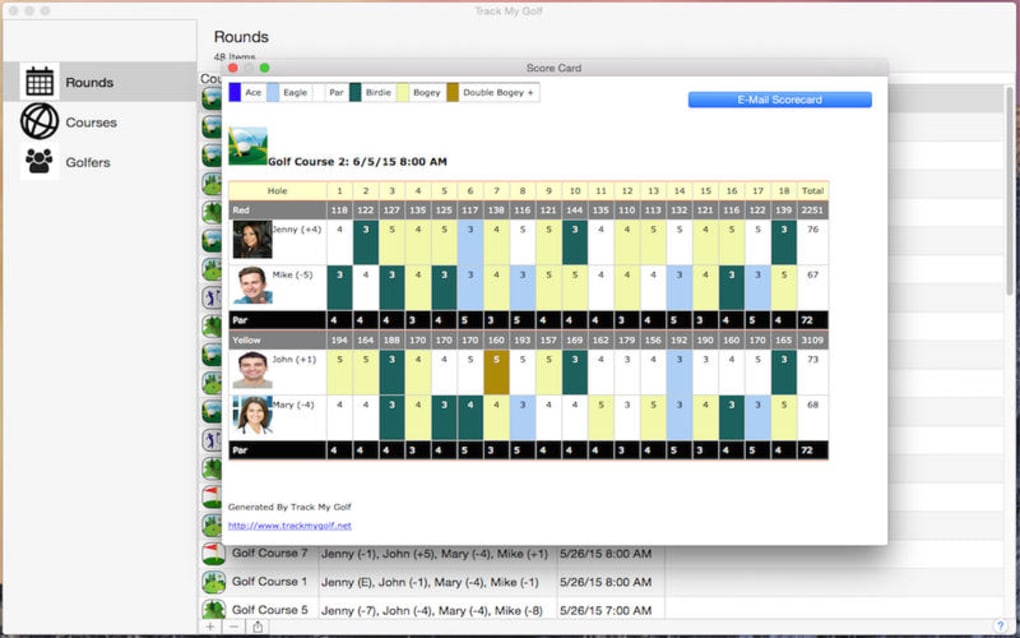
- Automatic Scorecard Creation: Generate a new scorecard with a single click; the app automatically populates holes, par values, and standard tee positions based on your selected course.
- Shot‑by‑Shot Logging: Record each shot’s distance, club, and outcome, allowing you to see exactly where your strengths and weaknesses lie.
- Course Database Integration: Built‑in database of over 5,000 worldwide courses; you can also import custom courses via GPX or CSV files.
- Performance Analytics Dashboard: Visual charts display fairway hits, greens in regulation, putting averages, and scoring trends over weeks or months.
- Apple HealthKit Sync: Sync walking distance, calories burned, and heart rate data from your round directly into Apple Health.
- Export & Share Options: Export scorecards to PDF, CSV, or share them via email and social platforms with a single tap.
- Secure Cloud Backup: Optional iCloud backup ensures your data is safe and accessible across all your Apple devices.
- Customizable Alerts: Set reminders for upcoming tee times, practice sessions, or equipment maintenance.
- Multilingual Support (Future Roadmap): Although currently English‑only, the development team plans to add additional languages based on community feedback.
Installation & Usage Guide
Step‑by‑Step Installation
1. Download the Installer: Visit the official APG Solutions website or the Mac App Store and click the “Download Track My Golf” button. The file will be saved as TrackMyGolf.dmg.
2.
Mount the Disk Image: Double‑click the .dmg file to open the installer window.
3. Drag to Applications: Drag the Track My Golf icon into the Applications folder shortcut provided in the installer window.
4. Launch the App: Open your Applications folder, locate “Track My Golf,” and double‑click to start.
5.
Grant Permissions: The first launch will prompt you to allow access to your Documents folder (for storing scorecards) and HealthKit (if you wish to sync fitness data). Click “Allow” to continue.
6. Complete Setup Wizard: A quick onboarding wizard walks you through selecting your home club, preferred measurement units (yards or meters), and linking your iCloud account for backup.
First‑Time Use
After the setup wizard, you’ll land on the main dashboard where you can create a new round. Click the “New Round” button, type the name of the course (or select from the integrated database), and the app will automatically load the appropriate layout. As you play, tap the “Add Shot” button after each stroke; a small modal asks for club, distance, and result (e.g., “missed left,” “on the green”).
The app instantly updates the scorecard and recalculates your statistics, giving you live feedback on fairway hits and putting performance. When the round is complete, you can press “Finish Round” to generate a detailed report that includes a visual heat map of shot distribution and a summary of key metrics. Export the report via the share icon, or let Track My Golf automatically sync it to iCloud for future reference.
Compatibility
Track My Golf is built for macOS 11.0 (Big Sur) and later. It runs natively on Apple Silicon (M1, M2, and newer) as well as Intel‑based Macs, delivering fast performance and low battery consumption. The app also offers a companion iOS version for iPhone and iPad, enabling you to log shots on the go and sync data across devices via iCloud. While the desktop version is free, the iOS counterpart follows a freemium model with optional in‑app purchases for advanced analytics.
Pros and Cons
Advantages
- Completely free core version – no hidden subscription fees.
- Intuitive macOS‑native interface that feels familiar to Apple users.
- Extensive course database and easy import of custom courses.
- Robust analytics dashboard with clear visualizations.
- Secure iCloud backup keeps your data safe and synchronized.
- HealthKit integration adds a fitness dimension to your golf tracking.
Limitations
- Currently English‑only; multilingual support is planned but not yet available.
- Advanced statistical modules require in‑app purchases.
- No live GPS integration; you must manually enter shot distances.
- Limited sharing options compared to some paid competitors (no direct posting to Instagram).
Frequently Asked Questions
Is Track My Golf really free?
Yes, the core application for macOS is completely free. You can track scores, view basic analytics, and sync data with iCloud without paying a dime. Optional premium modules are available for users who want deeper statistical insights.
Can I use Track My Golf on Windows?
Track My Golf is currently developed exclusively for macOS and iOS. There is no native Windows version at this time, though you can access exported PDFs or CSV files on any platform.
How does the iCloud backup work?
When you enable iCloud backup in the settings, every new round and its associated data are automatically uploaded to your iCloud account. This ensures that you can restore your history on a new Mac or iOS device simply by signing in with the same Apple ID.
Do I need a GPS device to log shot distances?
No external GPS is required. You manually enter the estimated distance for each shot. However, the app’s interface is designed for quick entry so it doesn’t interrupt the flow of your round.
Is my data secure?
Yes. All data stored locally is encrypted, and iCloud backups use Apple’s end‑to‑end encryption. The app does not share personal information with third parties unless you explicitly export or share a scorecard.
Final Verdict
Track My Golf stands out as one of the most polished free golf‑tracking solutions for macOS. Its blend of native design, comprehensive analytics, and secure cloud backup makes it a compelling choice for any golfer who prefers to keep their data on Apple devices. While it lacks some premium features found in paid competitors—such as live GPS integration and multi‑language support—the free version already provides everything most players need to monitor and improve their game. The optional in‑app purchases are reasonably priced and offer value for those seeking deeper statistical insights. Overall, the app earns a solid 4.5‑star rating for its ease of use, performance, and commitment to user privacy.
Conclusion & Call to Action
If you’re a Mac user looking for a reliable, free way to log every round and turn raw scores into meaningful insights, Track My Golf is the answer. Its seamless macOS integration, robust analytics dashboard, and secure iCloud backup mean you can focus on the game while the app handles the data. Ready to elevate your golfing experience? Download Track My Golf now and start tracking your progress today—no credit card required.







